Route medical images with intelligence
A self-hosted DICOM router that receives studies from any source, applies intelligent routing rules with AI-powered triage, and delivers to multiple destinations. Query, retrieve, and view with built-in DICOMweb API.
14-day free trial. No credit card required. Self-hosted deployment.
AI-Powered Triage
Send incoming chest X-rays to AI for pneumonia detection. Route urgent cases to on-call radiologists, routine cases to next-day reading list.
Multi-Site Distribution
Hospital receives studies from 3 imaging centers. Automatically route MRI to neuroradiology PACS, CT to general PACS, backup everything to S3.
Teleradiology Workflow
After-hours studies automatically forwarded to remote reading service. AI flags critical findings for immediate callback, archives locally for compliance.
Research & Analytics
De-identify and route specific modalities (CT, MRI) to research PACS. Send metadata to analytics platform while keeping images on-premise for HIPAA compliance.
Built for healthcare organizations worldwide
Complete DICOM workflow solution
Everything you need for medical image routing, AI integration, and PACS connectivity in one self-hosted package.
DICOM Server
Full-featured DICOM SCP/SCU with C-STORE, C-ECHO, C-FIND, and C-MOVE support. Automatic retry and health monitoring for reliable operations.
Smart Routing Engine
Route studies based on AE Title, modality, DICOM tags, and AI results. Priority-based rules with multi-destination parallel forwarding to PACS, S3, or file systems.
Ready-Made AI Infrastructure
No queues, no complex infrastructure. Just connect your AI endpoint and start augmenting images or generating reports. We handle callback routing, retry logic, and tag-based forwarding. (AI models not provided)
Security & Compliance
HIPAA-ready with audit logging, JWT authentication, encrypted secrets (AES-256-GCM), and TLS support. Self-hosted for complete data control.
Modern, intuitive interface
A clean web interface that your team will actually enjoy using. No training required.
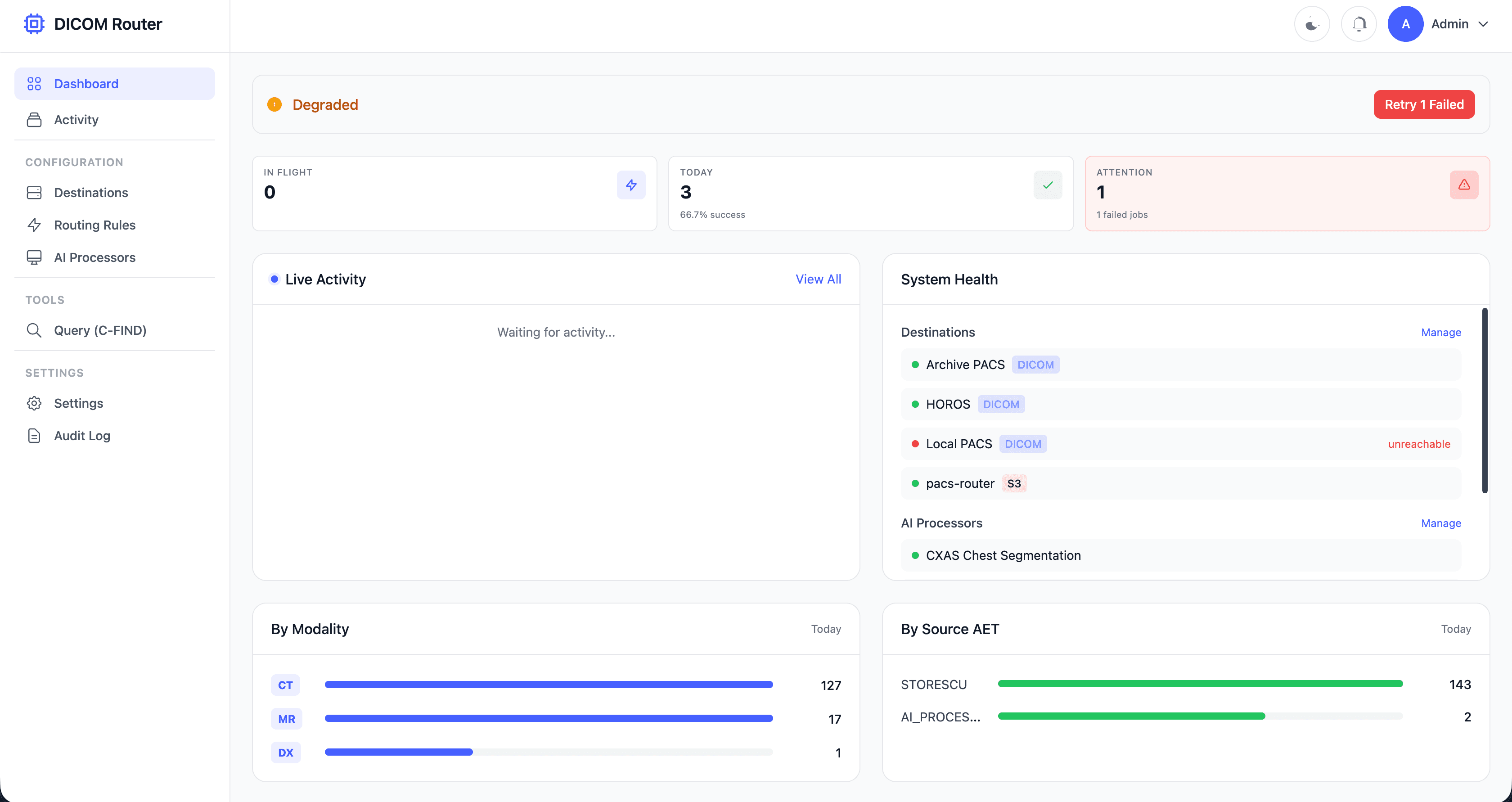
Real-time Dashboard
Monitor jobs, destinations, AI processors, and system health at a glance
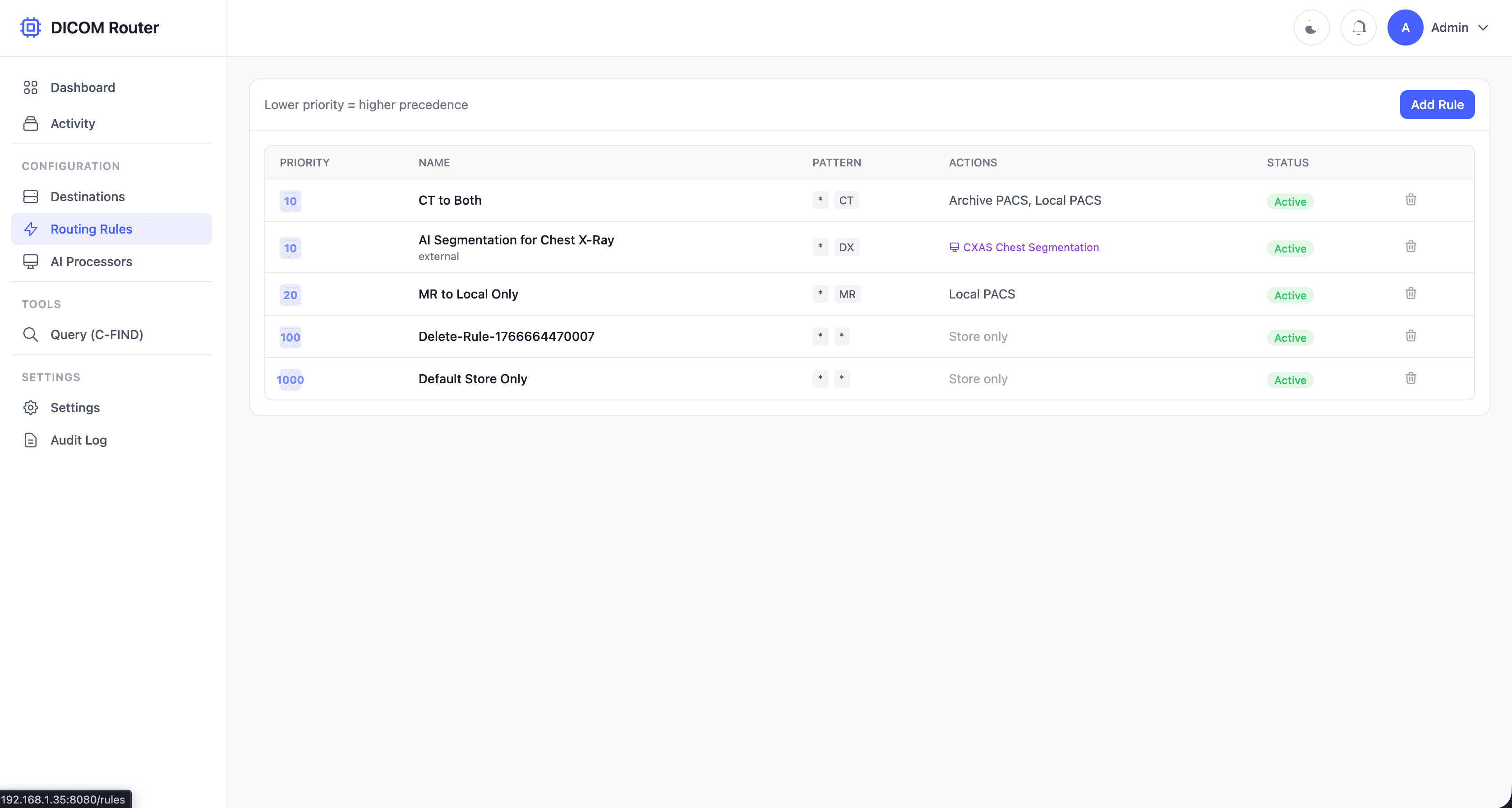
Routing Rules
Configure intelligent routing with AET patterns, modalities, and AI tag conditions
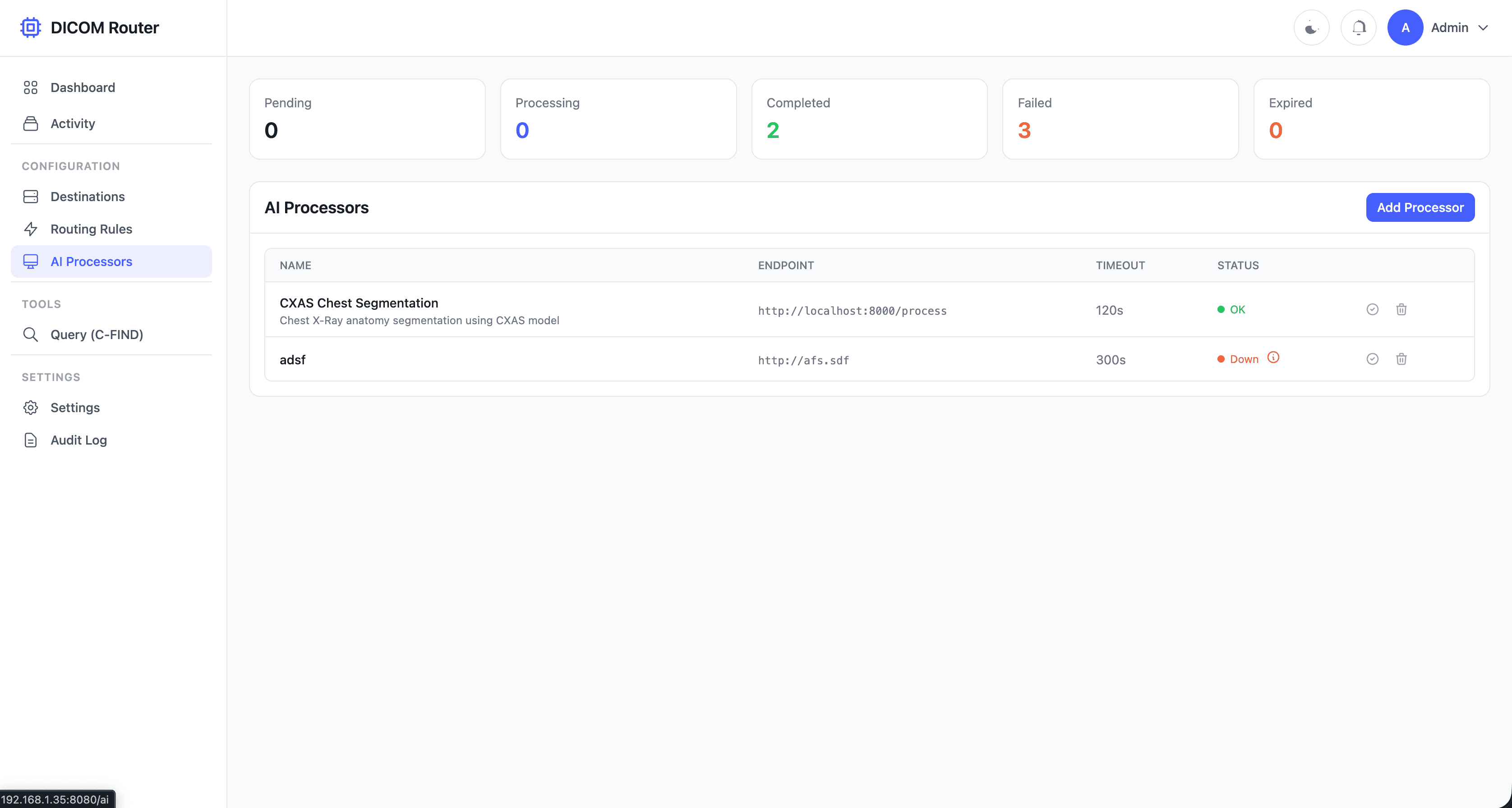
AI Processors
Manage AI containers, monitor job queues, and track processing status
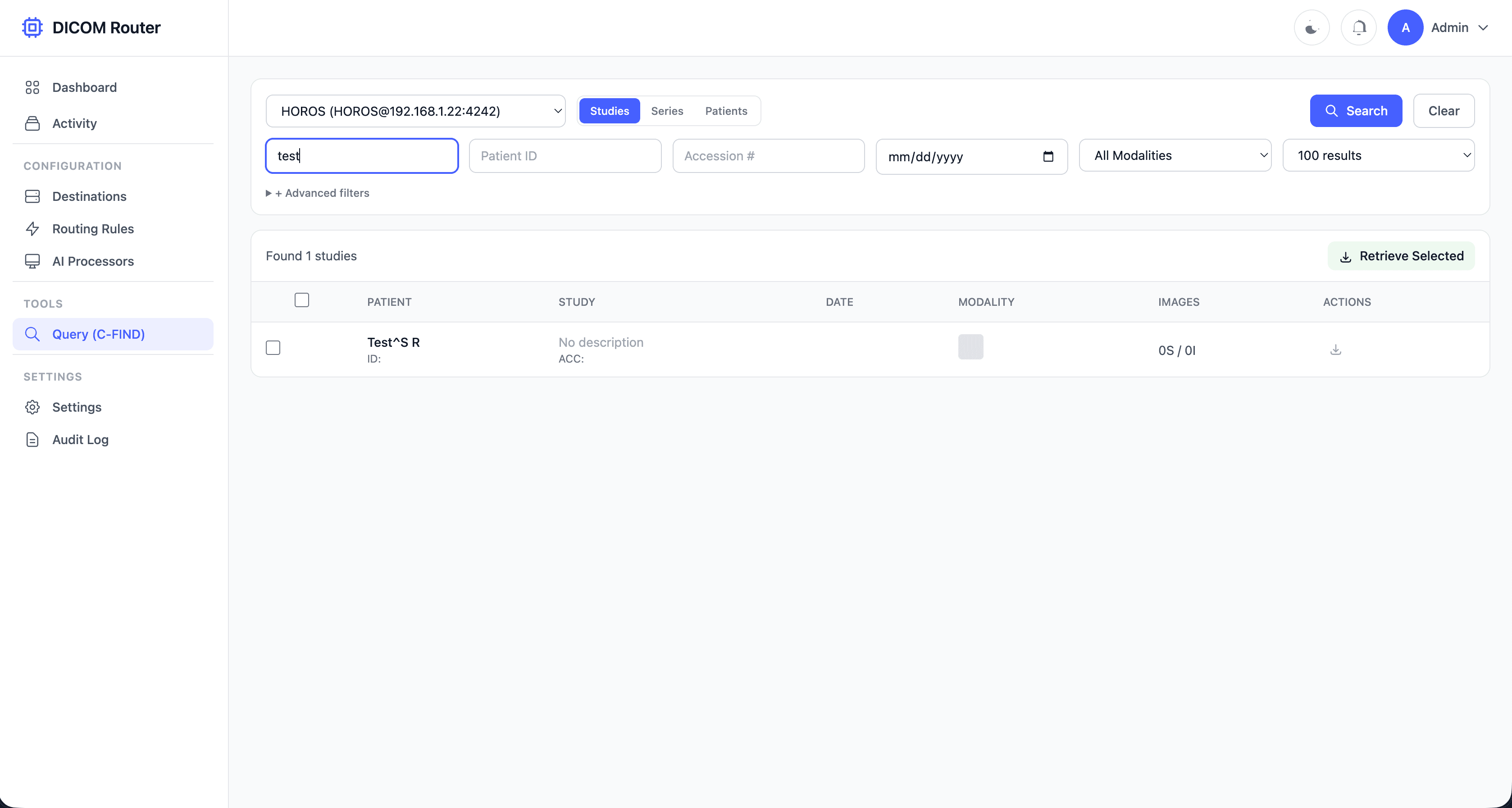
Query & Retrieve
Search connected PACS and retrieve studies with C-FIND/C-MOVE
Simple, predictable pipeline
Every study follows the same observable pipeline from ingestion to delivery.
Receive
Studies arrive via DICOM C-STORE protocol and are written atomically to disk with full metadata indexing.
Match
Routing engine evaluates rules by priority, matching AE Title, modality patterns, and AI-generated tags.
Process
Optionally send to AI containers for analysis. Results return via callback with classification tags.
Dispatch
Matched studies fan out to all configured destinations in parallel with automatic retry on failure.
Built for real-world workflows
From AI triage to multi-site distribution, DICOM Router adapts to your imaging workflow.
AI Triage Workflow
Automatically route urgent findings to emergency workstations while normal cases go to routine PACS queues.
CT scans → AI Chest Analysis → Urgent cases → Emergency WS, Normal → Archive PACSMulti-Site Distribution
Receive studies from scanners and distribute to multiple PACS systems, cloud archives, and AI platforms simultaneously.
MRI Scanner → Local PACS + Cloud S3 + AI PlatformVendor Neutral Archive
Consolidate images from multiple sources into S3-compatible storage with organized folder structures and full metadata preservation.
Multiple PACS → DICOM Router → MinIO/S3 ArchiveResearch Data Pipeline
Route specific modalities or study types to research databases while maintaining clinical workflow unchanged.
All MR Brain studies → Research NAS + Clinical PACSBuilt with proven technology
Go for performance and reliability. PostgreSQL for durability. A modern UI your team will love. No complex dependencies or vendor lock-in.
Get started in 5 minutes
Deploy DICOM Router and start routing studies with just a few commands.
Docker Compose
Everything runs in containers. PostgreSQL included. Ready in 60 seconds.
Binary Deployment
Single 42MB binary. No dependencies except PostgreSQL.
What happens next?
Special launch pricing
Lock in early bird rates forever. All plans include 14-day free trial. Prices increase after first 25 customers.
Starter
For small imaging centers
- Up to 10,000 studies/month
- 5 destinations
- DICOM routing + S3 storage
- Email support
- 30-day job history
Professional
For hospitals and clinics
- Up to 100,000 studies/month
- Unlimited destinations
- AI integration
- Query/Retrieve (C-FIND/C-MOVE)
- DICOMweb API + OHIF Viewer
- Priority support
- 90-day job history
Enterprise
For health systems
- Unlimited studies
- Unlimited destinations
- Multi-node deployment
- Custom AI pipelines
- OHIF Viewer integration
- 24/7 dedicated support
- On-premise deployment
- SLA guarantee
Frequently asked questions
Common questions about DICOM Router
What DICOM services are supported?
Full C-STORE (receive and send), C-ECHO (verification), C-FIND (query at Study/Series/Instance level), and C-MOVE (retrieve). DICOMweb API provides QIDO-RS and WADO-RS for web access.
How does AI integration work?
DICOM Router uses a callback pattern: it sends files to your AI container via HTTP, then receives results via a secure callback with HMAC signature verification. AI can return classification tags that trigger conditional routing rules.
How is it deployed?
DICOM Router runs as a single Go binary or Docker container within your infrastructure. The only dependency is PostgreSQL for job tracking and configuration. Deploy in minutes with docker-compose.
Is it HIPAA compliant?
Yes. Self-hosted deployment within your secure network, comprehensive audit logging (who/when/what), JWT authentication, AES-256-GCM encrypted secrets, TLS support, and no PHI in logs.
Can I integrate with OHIF Viewer?
Yes! The built-in DICOMweb API (QIDO-RS, WADO-RS) is compatible with OHIF Viewer v3+. Configure OHIF to use DICOM Router as a data source for browser-based image viewing.
What destinations are supported?
DICOM nodes (any PACS via C-STORE), S3-compatible storage (AWS S3, MinIO, Wasabi), and file systems (local or NFS). Each destination has health monitoring and connectivity tests.
How does routing work?
Define rules with AE Title patterns, modality filters, source type (external/AI output), and tag conditions. Rules are evaluated by priority. Matching studies go to all destinations in the rule.
What happens if a destination is down?
Failed transfers retry automatically with exponential backoff (30s → 30m max). Per-destination tracking shows exactly which transfers succeeded or failed. The dashboard alerts you to unhealthy destinations.
Ready to modernize your DICOM workflow?
Start your 14-day free trial today. Self-hosted, no credit card required.